Create Your First Project
Start adding your projects to your portfolio. Click on "Manage Projects" to get started


Webscraping
Code used at the bottom.
ETL Pipeline
Overview
The ETL pipeline was designed to discover NFL team article URLs, filter them down to player relevant data, extract the structured article text, and store the results in formats suitable for downstream sentiment analysis. Instead of scraping every page from every team, this pipeline breaks down the web scraping into stages, where each subsequent stage narrows the data and reduces unnecessary computation. The overall flow in code is discovery.py, player_article_match.py, scraper.py, body_text_links.py.
Discovery Stage
The discovery stage served as the extraction step of the ETL pipeline and focused on URL discovery. This process began by requesting each team website’s robots.txt file. Although robots.txt is typically used for crawler access rules, it also contains “Sitemap:” entries that point to the team’s XML sitemap files. Starting with robots.txt provided a reliable and scalable way to consistently locate the structured sitemap resources needed to find news URLs programmatically across 32 teams.
A sitemap is an XML document that organizes website content for automated systems. For our project, there were two sitemap forms we were looking for. The first was a sitemap index, which is a parent directory with links to additional sitemap files. The second was a urlset, which contains the direct page URLs. For both, the relevant links live in the <loc> tag of each XML page.
The sitemaps were critical to the discovery stage because they provided a structured inventory of URLs that were much more easy to traverse in a scalable way. Instead of having to navigate page by page, our pipeline was able to use the sitemap metadata to systematically collect roughly 600,000 URL candidates containing /news/ in them before narrowing down to player relevant news pages.
URL Filtering / Transformation
The second stage of the pipeline served as a data transformation step; where we narrowed down the full set of discovered URLs into a more targeted data set that was relevant to the 92 players. To do this, we used a clean CSV with the player’s names, and a separate name column, where the names were formatted in a URL search friendly slug format. The filtering logic compared those player slug names against the discovered news URLs from the discovery stage.
The motivation for this approach came from early inspection scrapped Packers articles, where player names consistently appeared in the article titles, which were reflected directly in the URL. Because of this pattern, URL matching became an efficient way to identify player related articles before performing the web scraping.
As a result, this stage acted as an efficient filtering method, reducing the number of pages needed to be downloaded and parsed. The dataset went from roughly 600,000 URLs in the discovery stage to about 20,000 matched URLs. This helped us lower our computational cost, and severely enhanced the relevance of the article data set for downstream individual player sentiment analysis.
Scraping and Structured Output
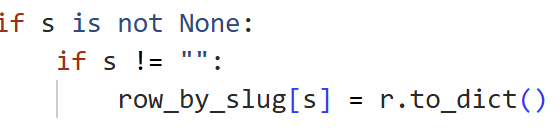
The final stage of our pipeline was the deeper extraction, transformation, and loading step of the web scraping portion of the project. After the URL filtering stage identified player related article candidates, I was able to first group the matched URLs to ensure that each unique article would only be downloaded once, even if multiple players are associated with that same article. This helped us reduce redundant requests, saving both time and compute. To accomplish this grouping, I implemented a hash map, where each URL acted as the key and the value stored the player slug name as it would appear in the URL.
Once the URLs were grouped, the scraper was built to request and download the HTML for each article, and then parse it using BeautifulSoup. From there, we were able to extract the body and title of the article, and remove other elements from the page we didn’t need such as headers and footers. As a team, we were also able to implement fallback logic in case there were websites with differing HTML structure, allowing us to adapt the scraper for all 32 websites.
The results were then stored in two structured formats. Each article and its content were assigned a stable SHA-256 hash based on its URL, acting as a unique article ID. The ID, URL, and body of text were then stored in JSONL format, with one JSON object per line. A separate CSV file was created to store the many to many relationships between the players and the articles. By assigning each article a unique ID, the output was able to resume from where it left off after interruptions and still store each article only once. Also, the clean storage structure made it easier for deduplication, downstream database ingestion, and sentiment analysis.
ESPN Scraper
The goal for this position of the project was to understand how NFL players are portrayed in the media, specifically through ESPN articles. I wanted to collect real articles tied to the specific players we had chosen and eventually analyze patterns like coverage, sentiment, and differences across positions. Instead of only looking at stats, the idea here was to focus on how players are talked about and represented.
To carry this all out, I started by using ESPN’s API, which provided a large dataset of all NFL players. Each player either had their full data available or a reference link that pointed to their full profile where all of the data was stored, so I built my code to handle both of those cases. From this dataset, I matched players against a list of players that we had chosen and some that were at random, across various positions and stored their names alongside their ESPN athlete IDs. These IDs were important because it allowed me to access each player’s specific page and every related news article in the database.
Once I had the player IDs, I made requests to another ESPN endpoint that provided an overview of each player, including a list of news articles. For each player, I looped through their associated articles and extracted the URLs. However, not every article that was returned was specifically focused on that player, so I had to add filtering logic to improve its accuracy. This brought my total articles of around 1100 down to just 350. I checked whether the player’s name appeared in the article headline or within the URL itself, which helped ensure the articles that were gathered were solely about that player and not just briefly mentioned.
After collecting all of the article links, I moved on to scraping all of the text from those articles. I used BeautifulSoup to parse the HTML of each page and extract the text from paragraph tags. To make the process a bit more stable, I added browser-like headers to my requests and included delays between each request so I wouldn’t overwhelm the server and eventually lead to crashes. This process ended up taking 20-30 minutes to grab each piece of text. I also filtered out weak or empty articles requiring the text to at least have 200 characters. This resulted in a dataset where each row included the player’s name, their ESPN ID, the URL, and the full body of text.
I successfully built a dataset of player specific ESPN articles that are now relevant, clean, and ready for further analysis. This dataset can now be used for sentiment analysis, comparing media coverage, and exploring different trends across positions. One important takeaway from this part of the project was how much filtering matters, because without it, a lot of the articles wouldn’t have been accurate.
Database Staging and Migration
Before we could begin data enrichment and sentiment analysis, we had to store and standardize it. We chose to host our document database using MongoDB Atlas. To begin the migration process, the espn articles and sitemap/team articles were imported into their own respective collections as a staging step. Because the two sources had different field structures, both collections were normalized into a shared target schema. This preserved common fields such as URL, body text, player information, and source attribution while making the records compatible enough to be able to live in a combined collection. After normalization, both staging collections were merged into the articles collection, which became the main oeuvre for enrichment and analysis.
Data Enrichment
After inspecting the articles in our merged collection, I found that a large number of articles associated with each player varied widely. To improve the quantity of data for each player and therefore strengthen the dataset for sentiment analysis, I added a data enrichment step and searched the bodies of text for additional player mentions. This was an important step in the project because the URL matching alone didn’t capture every relevant article to the players, especially if their name appeared in the body but not the title.
The script loaded in the CSV of players, read in the articles that were exported as JSON from MongoDB, and built a compiled regular expression from all of the players so each article was searched once. When a match was found, the result was written to another JSONL file and the matching method was recorded. This allowed us to recover additional relevant player article links from the data we had already collected.
This drastically improved the amount of data we had for some players. For example, Budda Baker had only five articles where his name appeared in the URL, but had 132 mentions across the merged article corpus. Because of this, our final dataset was more complete and better suited for downstream player level sentiment analysis.
Works Cited
“argparse — Parser for Command-Line Options, Arguments and Subcommands.” Python Documentation, Python Software Foundation, https://docs.python.org/3/library/argparse.html. Accessed 9 Apr. 2026.
“Built-in Types.” Python Documentation, Python Software Foundation, https://docs.python.org/3/library/stdtypes.html#mapping-types-dict. Accessed 9 Apr. 2026.
“Built-in Types.” Python Documentation, Python Software Foundation, https://docs.python.org/3/library/stdtypes.html#set-types-set-frozenset. Accessed 9 Apr. 2026.
“Create and Submit a robots.txt File.” Google for Developers, Google, https://developers.google.com/crawling/docs/robots-txt/create-robots-txt. Accessed 9 Apr. 2026.
“hashlib — Secure Hashes and Message Digests.” Python Documentation, Python Software Foundation, https://docs.python.org/3/library/hashlib.html. Accessed 9 Apr. 2026.
“os — Miscellaneous Operating System Interfaces.” Python Documentation, Python Software Foundation, https://docs.python.org/3/library/os.html#os.makedirs. Accessed 9 Apr. 2026.
“os.path — Common Pathname Manipulations.” Python Documentation, Python Software Foundation, https://docs.python.org/3/library/os.path.html. Accessed 9 Apr. 2026.
“pandas.DataFrame.groupby.” pandas Documentation, pandas, https://pandas.pydata.org/docs/reference/api/pandas.DataFrame.groupby.html. Accessed 9 Apr. 2026.
“Quickstart.” Requests Documentation, https://docs.python-requests.org/en/latest/user/quickstart/#timeouts. Accessed 9 Apr. 2026.
“re — Regular Expression Operations.” Python Documentation, Python Software Foundation, https://docs.python.org/3/library/re.html. Accessed 9 Apr. 2026.
RFC 8259. The JavaScript Object Notation (JSON) Data Interchange Format. RFC Editor, https://www.rfc-editor.org/rfc/rfc8259. Accessed 9 Apr. 2026.
sitemaps.org. “Protocol.” sitemaps.org, https://www.sitemaps.org/protocol.html. Accessed 9 Apr. 2026.
urllib.parse — Parse URLs into Components.” Python Documentation, Python Software Foundation, https://docs.python.org/3/library/urllib.parse.html. Accessed 9 Apr. 2026.
Zaczyński, Bartosz. “Build a Hash Table in Python With TDD.” Real Python, https://realpython.com/python-hash-table/. Accessed 9 Apr. 2026.
Zaczyński, Bartosz. “Beautiful Soup: Build a Web Scraper With Python.” Real Python, https://realpython.com/beautiful-soup-web-scraper-python/. Accessed 9 Apr. 2026.
Zaczyński, Bartosz. “Working With JSON Data in Python.” Real Python, https://realpython.com/python-json/. Accessed 9 Apr. 2026.
“xml.etree.ElementTree — The ElementTree XML API.” Python Documentation, Python Software Foundation, https://docs.python.org/3/library/xml.etree.elementtree.html. Accessed 9 Apr. 2026.
“Syllabus for CSCI 2270 Comp Sci 2: Data Struct (Spring 2025).” Canvas, University of Colorado Boulder, Spring 2025.